

Brat Text Transparent Background PNG (Free Download Guide)
If you’ve ever tried to slap brat-style text onto a photo and ended up with an ugly white box around it, you already know why transparent PNGs matter. A brat text PNG with a transparent background lets you layer that iconic lowercase text over any image, video, or thumbnail — no design skills needed.
This guide shows you how to create one for free, download it the right way, and use it everywhere from CapCut to Instagram. By the end, you’ll know exactly how to make, save, and reuse your own transparent text overlays — and how to avoid the mistakes that trip most people up. Grab a transparent PNG from the free brat generator

What Is a Transparent Brat Text PNG?
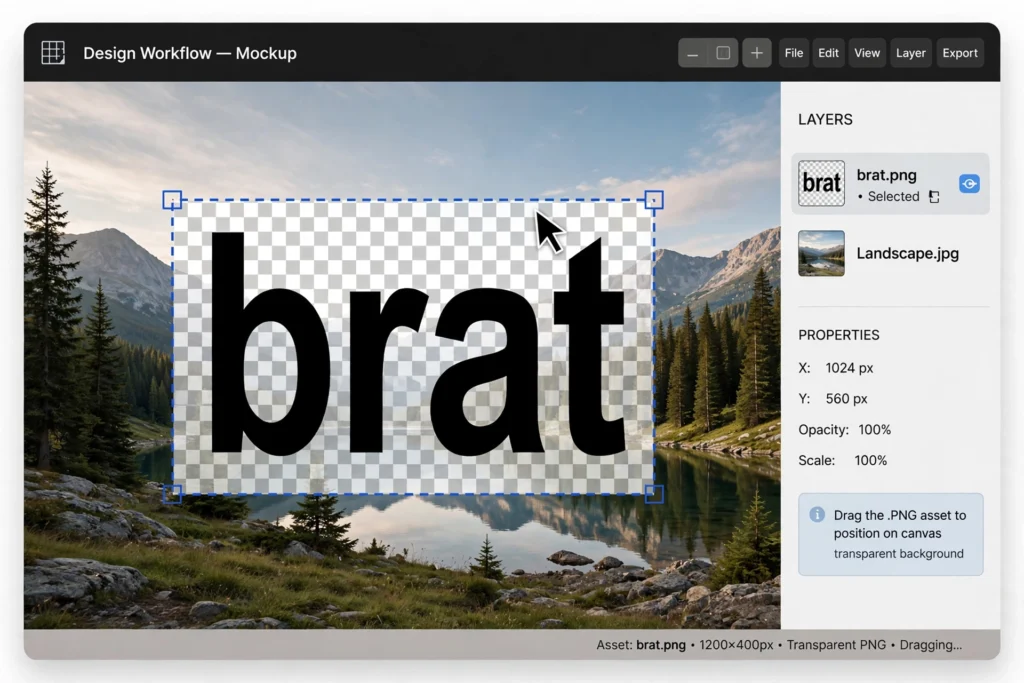
A PNG with a transparent background stores your text as pixels and everything else as nothing — literally. Open it over a photo and only the letters show up; the rest lets the image through. That is the entire trick, and it is why transparent PNGs beat screenshots, JPGs, or text boxes every time.
The brat version of this is especially useful because the style is so simple: blurry lowercase Arial, black on green or just black. No gradients, no outlines, no fuss. That simplicity means the PNG stays tiny, loads fast, and looks right anywhere you drop it.
How to Create One (Free)
Open Canva and start a new design, then make sure the background is transparent — Canva’s free plan lets you download PNGs with transparency. Add a text box, type your phrase in all lowercase, and pick a condensed font like Arial Narrow. Keep the canvas simple: one text box, no effects, no shadows.
The brat look is deliberately plain, so extra styling only gets in the way. Set the color to black, delete or hide any background layer, and download as PNG with the transparent background option checked.
If you want the exact lettering, our brat font download guide points you to the right files. Working inside Canva? Our brat font in Canva guide shows how to get the look right.
How to Download It
If you’re grabbing a ready-made PNG from a generator or website, always use the actual download button — never screenshot the preview. Screenshots flatten transparency and leave you with a baked-in background. Right-click and Save As works on most sites, but a real download gives you the full-resolution file.
After downloading, check the file: the thumbnail should show a checkerboard or grey background, not white. If it shows white, the file was never transparent.
Where to Use It (CapCut, Canva, Instagram)
This is where the PNG earns its keep. In CapCut, import it as an overlay on your video timeline and stretch it across the clip. In Canva, drag it onto any design as an image layer.
On Instagram, paste it into a story through the sticker or photo-import feature. Because it is transparent, it blends into Reels, thumbnails, and profile pictures without clashing. Already have a photo picked out? Here is how to add brat text to a photo step by step.
Troubleshooting
White background showing up? You probably saved as JPG, or the source file was never transparent to begin with — re-export as PNG with the transparency option on. Text looks blurry? Your PNG was too small; start with a high-resolution file at least 1000 pixels wide.
Text edges look rough? That usually means the original was upscaled from something tiny — recreate it at a larger size instead. Colors look off? Some apps compress uploads, so export at maximum quality. File won’t import into CapCut? Re-export it as a standard PNG in Canva first — that fixes most compatibility hiccups.
How do I download brat text as PNG?
Use a brat text generator’s download button and choose PNG with a transparent background, or design your own in Canva and export with transparency enabled. Always check the file before you use it.
Why does my PNG have a white background?
Either the source file was never transparent, or it got saved as a JPG — and JPGs cannot store transparency. Re-download or re-export it as a true transparent PNG.
Can I use it in CapCut?
Yes. Import the PNG and add it as an overlay on your video, then resize, reposition, or animate it like any other sticker.
Is it free?
Yes. Creating your own in Canva and downloading ready-made versions from free generators both cost nothing.
A transparent brat text PNG is one of those tiny assets you will reuse endlessly. Create or download it once, keep it on your phone, and you will be ready to brat-ify any photo or video in seconds. Bookmark this page or save the PNG somewhere handy — trends move fast, but a good transparent text overlay never goes out of style.


2 Comments