
Brat Lyrics Generator: Make Lyric Videos in Brat Style
Lyric videos are all over TikTok and Reels, and the ones that grab attention share one look: blurry, lo-fi text on a loud lime-green background. That’s the brat aesthetic, borrowed from Charli XCX’s 2024 album cover, where a deliberately rough design became a full-blown internet phenomenon.
You don’t need design skills or paid software to join in — a brat lyrics generator recreates that iconic text style in seconds. This guide walks you through making a brat-style lyric video, the best tools for it, and how to share it so people actually watch. Write your first verse on the brat generator homepage
What Is a Brat Lyrics Generator?
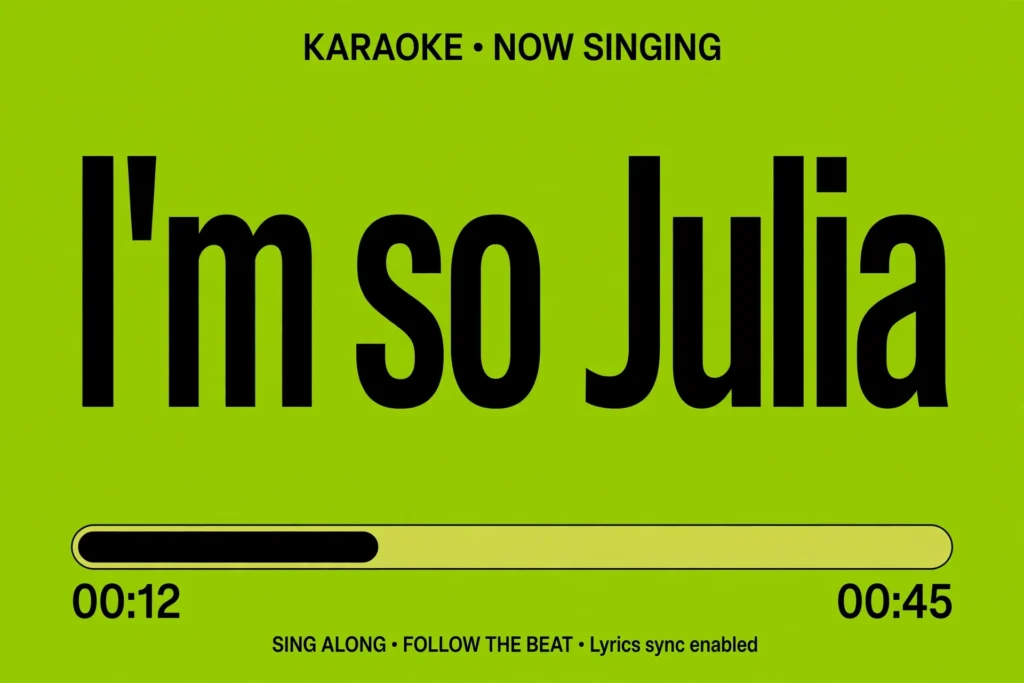
A brat lyrics generator is a small online tool that copies the look of the Brat album cover text. Type in any word or phrase and it renders it in plain Arial, slightly blurred and stretched, on that famous neon green.
The appeal is how intentionally rough it looks — the original cover resembled a quick mockup, and that rawness made it perfect meme material.
People use these generators for lyric videos, memes, and fake album covers. The text exports as a transparent PNG or screenshot that you layer over photos or video.
Most are free with no sign-up: type, preview, download. The high-contrast black-on-green text pops on small screens, and viewers get the reference instantly.
How to Make a Brat Lyric Video
Pick your song and clip first. Most brat lyric videos run 15 to 30 seconds — the best verse or catchiest chorus.
Trim the audio before adding text so you know exactly where each line falls. Working with a short clip keeps the project manageable and matches how people actually watch on TikTok.
Open a brat lyrics generator and type your first line. Keep each screen to four to eight words — long sentences are hard to read on a phone and kill the punchy rhythm.
Download each line as a separate image so you can time them individually. Short lines also give you more cuts, which keeps the video moving.
Drop the images into your editor above your background clip — the music video, a concert clip, or plain blurry green. Center the text, scale it up, and trim each image to match the lyric timing.
Watch with sound on and nudge clips until changes land on the beat, then export in 1080×1920.

Best Tools for Brat Lyrics
The easiest route is a dedicated tool. The brat video text generator on this site renders the signature look instantly — font, blur, and green dialed in — with no account or watermark. It’s the fastest way to get text ready for a video.
For more control, use Canva: a 9:16 canvas, lime-green fill (#8ACE00), black Arial text, and a slight blur from the effects panel. Photoshop or Photopea match the original even closer, but that’s overkill for most lyric videos.
Syncing Text with Music
Syncing separates decent lyric videos from great ones. Note where each line begins, then place each lyric image so it appears exactly when the line is sung.
In CapCut you can split clips with one tap, which makes this fast. This CapCut tutorial covers text overlays step by step if you want a deeper walkthrough.
Keep the pacing snappy — text changes every two to four seconds feel best. Let long-held lines sit instead of rushing them. Mute the video and watch once: if the changes still feel rhythmic without sound, your timing is solid.
Sharing on TikTok & Reels
Upload natively in 9:16 — never landscape with black bars. Keep captions short, add targeted hashtags (#brat, #lyricvideo, #charlixcx), and post when followers are active. Reply to comments in the first hour, since both platforms reward early engagement.
Don’t stop at one video: accounts that grow with this format post series, like different verses of the same song. For fresh concepts, these brat meme ideas adapt well into lyric videos.
You don’t need to be a designer to land on everyone’s For You page. A brat lyrics generator handles the style, your phone handles the editing, and a little attention to timing handles the rest. The brat aesthetic rewards speed and confidence over perfection.
What is a brat lyrics generator?
A brat lyrics generator is a free online tool that recreates the text style of Charli XCX’s Brat album cover. Type in any words and it renders them in blurry Arial on the iconic lime-green background, ready to download for lyric videos, memes, or posts.
Can I make lyric videos for free?
Yes. The generators are free and phone editors like CapCut cost nothing. You need a song clip, the text images, and a few minutes — no paid software or design experience.
Which app is best for brat lyric videos?
CapCut is the best pick: free, phone-friendly, and great for layering text and trimming clips to the beat. VN and InShot are solid alternatives.
How do I sync lyrics with music?
Place each lyric image on the timeline so it appears exactly when the line is sung. Change text every two to four seconds and nudge clips until they land on the beat.

4 Comments